Anyone who works with Elementor already knows how powerful it can be for building attractive WordPress pages. However, as a project grows, new demands quickly show up: advanced filters, dynamic content, global templates, smarter pop-ups, and layouts that feel truly unique. That’s why, when the goal is to go beyond the “traditional builder,” Crocoblock enters the picture as a serious upgrade.
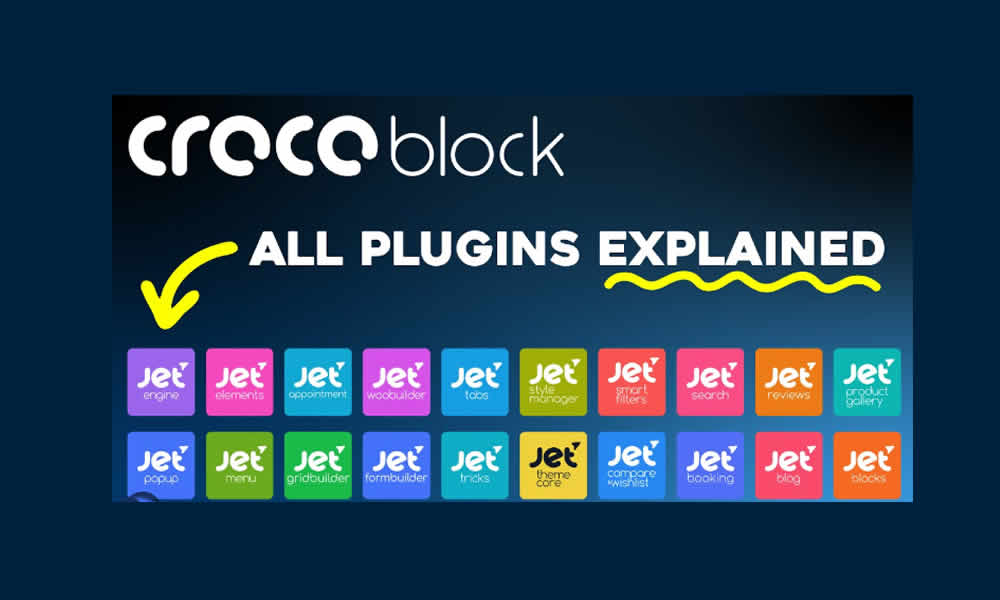
This bundle brings together more than 18 premium plugins designed to expand what you can do inside Elementor. Additionally, because it includes specific tools for specific needs, it helps you build more complete sites without relying on complicated custom development. That way, Elementor stops being just a visual editor and becomes a solid foundation for professional-grade projects.
In fact, many entrepreneurs, freelancers, and agencies choose it because it speeds up production and improves the final quality. As a result, a well-built site not only looks better, but also performs better: it guides the visitor, makes actions easier, and therefore increases conversions.
What Crocoblock Is and Why It Became So Popular
Crocoblock is a collection of add-ons created specifically for Elementor. In practice, it adds new widgets, templates, dynamic modules, and site-building tools that make projects more interactive, scalable, and organized. Additionally, its focus is clear: solve real problems that appear when a site needs deeper customization without losing visual control.
On the other hand, it’s not just “more widgets.” In contrast, it includes features that affect the entire site structure, such as header and footer control, dynamic content creation, advanced filtering, and full WooCommerce customization. That way, it fits everything from online stores and learning platforms to corporate sites and conversion-focused landing pages.
In other words, Crocoblock turns Elementor into a super visual builder, giving you more freedom to design, automate, and present content in an intelligent way.
The Best-Known Plugins Inside the Crocoblock Bundle
Inside the Crocoblock ecosystem, a few modules are often the deciding factor for choosing the package. That’s why it helps to understand what each one brings to a real project. Additionally, when you combine them, the site gains both visual consistency and functional depth without “patchwork” solutions.
JetElements adds a broad collection of extra widgets, useful for building sections with more visual resources and conversion-ready blocks. That way, it’s common to use it for counters, pricing tables, galleries, sliders, and content modules with a more polished presentation.
JetEngine is, for many users, the heart of the bundle. In fact, it lets you build dynamic content, custom fields, relationships between posts, and complex structures without heavy coding. That’s why it’s ideal for directories, catalogs, portals, and any project that needs organized data.
JetSmartFilters brings powerful filters for internal search and navigation. As a result, users find what they need faster, which improves experience and retention. Additionally, in large catalogs or stores, these filters can be the feature that turns browsing into a purchase.
JetWooBuilder focuses on WooCommerce and lets you customize product pages, categories, cart, and checkout flows. That way, a store stops looking “generic” and can match the brand identity. On the other hand, this customization can also reduce friction in the buying journey.
JetThemeCore supports global templates: headers, footers, archives, and reusable layouts. That way, the project stays consistent and becomes easier to update. Additionally, when a client requests changes, the edits are faster and more controlled.
JetPopup lets you build dynamic pop-ups with advanced display conditions. That’s why it’s useful for lead capture, targeted offers, or guiding visitors based on behavior. In contrast, a poorly configured pop-up can be annoying; therefore, smart rules are what turn it into a strategic tool.
Why Some People Look for a GPL Version and What It Means for a Project
The official Crocoblock subscription can be expensive, especially for freelancers or smaller agencies managing many websites. That’s why some people search for alternative licensing options. However, it’s important to keep a professional perspective: what matters most in a project is security, stability, and the ability to keep the site updated without unnecessary risk.
In that sense, when the topic is “GPL,” the key point is not only price, but also the source of the files and the way maintenance is handled. Additionally, when plugins come from unsafe channels, the risk of malware or backdoors increases. As a result, the safest approach is to use trusted sources and apply best practices: backups, staging environments, and careful update control.
That way, the project stays professional, and savings don’t turn into a future problem.
What You Can Build With Crocoblock in Real Life
The real advantage of Crocoblock is that it opens up a wide range of possibilities without forcing you to “reinvent” the site every time. That’s why it works across many business models. Additionally, because everything lives inside WordPress, you keep full control.
In custom e-commerce sites, you can combine smart filters, product templates, and dynamic modules to make the catalog easier to navigate. That way, users find products faster, compare more comfortably, and buy with less friction. Meanwhile, the site owner gains deeper control over design and conversion flow.
In course platforms, dynamic structure helps you organize content and access in a more advanced way. In fact, with JetEngine you can create specific content types, listings, and relationships that improve the student experience. Additionally, as the platform grows, scaling becomes simpler and cleaner.
In news portals or content-heavy websites, combining taxonomies, filters, and dynamic blocks keeps information organized. That’s why readers don’t get lost, and as a result time on site tends to increase. On the other hand, better navigation can also support SEO by improving engagement signals.
In corporate websites, Crocoblock makes it easier to build reusable templates and consistent layouts. That way, the site feels more professional and future updates become simpler. In contrast, a site built page-by-page with no structure is usually harder to maintain.
In conversion-ready landing pages, condition-based pop-ups, dynamic sections, and additional widgets help guide the visitor. That’s why paid campaigns can perform better, because the page is built to convert, not just to “look nice.”
Direct Advantages When You Use Crocoblock With Elementor
Once you install a bundle like this, the benefits show up quickly. First, your site gains more visual tools without losing consistency. Additionally, the modules are designed to work with Elementor, which reduces conflicts compared to mixing many plugins from unrelated sources.
On the other hand, having more than 18 premium plugins in one package reduces the time spent searching, testing, and replacing tools. As a result, your workflow becomes faster. Meanwhile, responsive behavior is built into the widgets, which matters because mobile users are the majority for many industries.
Additionally, scalability becomes a strong point: you can start small and activate extra modules only when the project requires them. In summary, WooCommerce support also opens doors to stronger commercial websites with better structure.
Installation and Setup Without Headaches
Setup is usually simple, as long as the package is well organized and comes from a trusted source. In general, you upload the plugin files in WordPress and activate them. After that, the add-ons become available inside Elementor, ready to use in widgets, templates, and global settings.
Then, it’s best to configure with intention: define which modules you will actually use, avoid excess, and test the site on mobile. That way, performance stays stable and the design doesn’t become overloaded. Additionally, testing in a staging environment helps prevent surprises on production sites.
Crocoblock vs Elementor Pro: They Don’t Compete, They Stack
A common question is whether Crocoblock replaces Elementor Pro. The answer is no. In fact, they complement each other. Elementor Pro provides official core features that many sites rely on, while Crocoblock expands the toolset with advanced modules and dynamic-focused functionality.
That’s why, when combined, they form one of the most complete environments for building WordPress sites: powerful visual design, global templates, dynamic content, filters, pop-ups, and deeper WooCommerce control. As a result, the site ends up not only attractive, but also functional and scalable.
The Final Touch That Lifts a Project: More Control, More Identity, Better Results
At the end of the day, Crocoblock isn’t just an “extra” for Elementor. It’s a way to transform a visual builder into a system that can support professional projects with structure, logic, and stronger user experience. Additionally, when a site feels unique and well organized, brand authority increases and visitors trust faster.
That’s why, if your goal is to create pages with personality, stores with smart navigation, or platforms built on dynamic content, this bundle can make a real difference. In summary, it’s built for people who want to deliver more value without making the building process harder than it needs to be.