Website navigation is one of the most important factors for helping users find what they need without wasting time. In fact, a poorly structured menu can frustrate visitors, increase abandonment, and hurt sales or inquiries. That’s why more and more digital projects choose UberMenu Premium Megamenu Plugin, a powerful and fully customizable WordPress solution that replaces basic menus with a far clearer, more visual, and more efficient experience.
Moreover, in a competitive environment, details matter. On the other hand, when someone enters an e-commerce store or a corporate website and the menu doesn’t help, users feel disorder and start doubting the brand. By contrast, when the menu guides, organizes, and highlights relevant options right away, the perception changes: the site looks more professional and becomes easier to use. As a result, UberMenu isn’t “just a menu”—it’s a modern, intuitive, highly functional mega menu that can elevate almost any project to a higher level.
What UberMenu Premium Megamenu Plugin Is
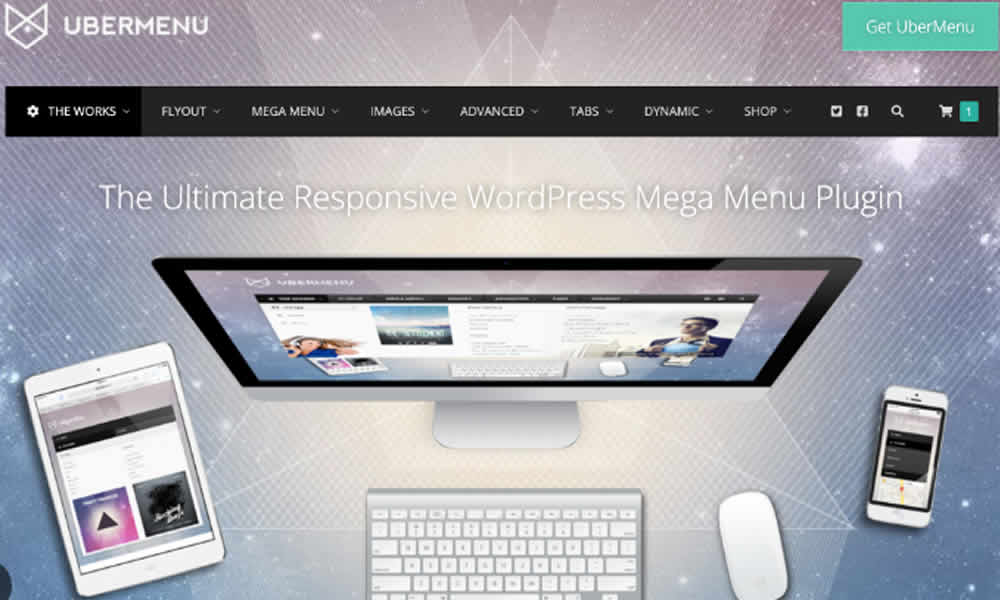
UberMenu is a premium WordPress plugin that replaces traditional menus with a more sophisticated and responsive system. With it, you can build an advanced mega menu arranged in columns, with images, icons, thumbnails, text blocks, videos, and even custom widgets. That way, the menu stops being a simple list of links and becomes a navigation panel that supports users with truly helpful information.
Additionally, this approach goes far beyond basic navigation. As a result, the menu becomes a strategic design element that improves usability and reinforces the site’s visual identity. By contrast, when a menu is limited to the minimum, you lose a huge opportunity to direct visitors to categories, services, products, and featured content.
Why UberMenu Is Considered Essential for Demanding Projects
Unlike native WordPress menus, UberMenu was built for projects that need flexibility and visual impact. That’s why it adapts easily to different site types: e-commerce, content portals, corporate websites, professional blogs, and marketplaces. Moreover, when a structure has many categories and sections, a mega menu prevents chaos and organizes information in a readable, user-friendly way.
In fact, UberMenu lets administrators organize complex content clearly and attractively without relying on custom code or external tools. As a result, the menu stops being an obstacle and becomes a smart shortcut. Furthermore, when users find what they want faster, satisfaction increases, friction decreases, and site performance improves in the metrics that matter.
Features That Truly Make a Difference
UberMenu stands out because it combines aesthetics with structure. Moreover, its setup is designed so customization doesn’t become a nightmare. That’s why the experience feels premium in daily use—especially when the site grows and the menu becomes a central part of the journey.
Fully responsive design: the menu adapts automatically on desktop, tablet, and mobile, keeping a consistent experience across devices. As a result, functionality doesn’t get lost when traffic comes from smartphones, which is increasingly common.
Images and icons integration: you can add featured images, vector icons, and product thumbnails to make navigation more visual. By contrast, classic menus are usually text-only, which limits impact and slows down decision-making.
Dynamic content support: beyond links, you can insert widgets, shortcodes, forms, text blocks, and even videos. That way, the menu can include promotions, shortcuts to key categories, an on-menu search bar, or a featured CTA without breaking the design.
Intuitive configuration panel: many adjustments take only a few clicks. In fact, that speed helps agencies iterate faster, because updates don’t require a developer for every small change.
Compatibility with themes and builders: UberMenu typically integrates well with major themes and builders like Elementor, WPBakery, and Divi. As a result, the site gets a robust mega menu with fewer conflicts and less rework.
Practical Benefits: When the Menu Stops Being “Just a Detail”
By implementing UberMenu, a site communicates professionalism and organization, two signals that help retain visitors and build trust. Moreover, a well-designed menu reduces confusion, improves navigation, and guides users toward high-value actions. That’s why the impact shows up in both user experience and business results.
In e-commerce, for example, you can display categories, featured products, active promotions, support access, and key sections directly in the menu. As a result, users reach the right product faster and the shopping flow feels smoother. On the other hand, on corporate sites, the menu can organize services, contact, case studies, and important content in a clear layout, so visitors don’t have to “guess” where things are.
Additionally, for professional blogs and content portals, a mega menu can group topics, formats, and sections with real logic, which improves the reading journey and keeps visitors moving through the site. By contrast, when content grows but the menu stays basic, navigation becomes harder and the site loses potential. In summary, this level of customization turns the menu into a strategic conversion tool, not just a navigation bar.
Real-World Scenarios: How UberMenu Feels Day to Day
Imagine entering an online store and seeing product photos, shortcuts to popular categories, active promotions, and a direct support or buy button—right inside the menu. In fact, that kind of experience reduces steps and speeds up decisions. Similarly, imagine a business website where the menu provides immediate access to services, solutions, blog, and contact, without forcing visitors to scroll through the whole page first.
These scenarios are possible because of the flexibility of UberMenu Premium Megamenu Plugin. Moreover, the plugin helps combine functionality with visual design, creating menus that not only guide but also sell and drive engagement. In summary, the menu stops being a simple “map” and becomes an intelligent storefront.
UberMenu vs Traditional Menus: The Difference Shows in Seconds
While native menus often provide a simple list of links, UberMenu delivers a true interactive navigation panel. That’s why users can understand the site structure faster and choose where to go with more confidence. Moreover, by consolidating multiple capabilities in one solution, it reduces the need to install several plugins just to “improve the menu.”
In practice, UberMenu can deliver advanced organization, multimedia content blocks, widget compatibility, and responsive behavior automatically. As a result, navigation becomes stronger without adding complexity. By contrast, fragmented solutions often make a site heavier or inconsistent. Therefore, it’s no surprise that UberMenu is favored by agencies and professionals who want to deliver high-level projects.
How to Install and Activate UberMenu in WordPress
The process is typically quick. First, you download UberMenu Premium Megamenu Plugin from your provider and upload the .zip file in the WordPress dashboard. Then, you install and activate it like any other plugin. As a result, the menu becomes available for configuration inside the menu management area.
After that, you choose the layout, adjust styling, and build the structure with columns, icons, images, or widgets depending on the site strategy. Moreover, it’s smart to prioritize links that truly matter: top categories, best-selling services, contact, support, and featured content. In summary, in a short time, a site can be equipped with a modern, professional mega menu.
SEO, Time on Site, and Conversions: Why a Better Menu Matters
In today’s digital landscape, competition is strong and users decide quickly whether to stay or leave. That’s why a clear menu has a direct influence on time on site and interaction rate, signals that often accompany stronger user experience. Moreover, when people navigate more pages and find what they need, the site creates more opportunities to convert.
On the other hand, a well-structured menu helps distribute internal traffic more intelligently. As a result, important pages receive visits naturally, and the site’s internal structure becomes more effective. By contrast, when navigation is confusing, users get frustrated and leave. In summary, UberMenu isn’t only about design—it’s an UX strategy that can influence SEO performance and business outcomes through better behavior signals.
The Final Touch That Makes Users Want to Stay
Having a fast, secure, well-built website is essential. However, navigation that impresses from the first interaction is what keeps users inside. That’s why UberMenu becomes a strong ally when the goal is to communicate authority, speed up access to information, and improve site performance.
Ultimately, UberMenu Premium Megamenu Plugin turns the simple act of navigation into an experience that feels smooth, practical, and conversion-focused. As a result, the menu stops being a secondary component and becomes a central part of a modern digital strategy.